To enable clean Git diffs, prevent notebook metadata noise, and provide high-fidelity Markdown inputs for SLM/LLM assistants (e.g., Aider) while preserving execution state.
Executive Summary
This document establishes a Production-Ready protocol for AI engineering that bridges the gap between interactive data science and rigorous software engineering. By implementing Semantic Notebook Versioning, teams can achieve industrial-grade compliance with ISO/IEC/IEEE 29148 and SWEBOK standards.
Core Objectives
Decouple Logic from State: Separate human-readable MyST Markdown (source of truth) from JSON-based
.ipynbartifacts (execution state).Enable AI-Native Development: Provide high-fidelity, token-efficient Markdown inputs optimized for Small Language Models (SLMs) and AI assistants like Aider.
Enforce Artifact Integrity: Utilize automated Git hooks and CI pipelines to ensure synchronization and prevent “metadata noise” from polluting the version history.
Stakeholder Benefits
For Lead Engineers: Simplifies code reviews with clean, line-by-line diffs that focus exclusively on logic changes.
For AI/ML Developers: Provides a stable environment where interactive exploration does not compromise GitOps-native workflows.
For Project Managers: Ensures all development artifacts are traceable, verifiable, and maintainable, meeting international software quality criteria.
Standard Compliance Alignment
The methodology is classified as Production-Ready because it adheres to the following frameworks:
1. ISO/IEC/IEEE 29148: Requirements Engineering
The standard mandates that specification artifacts be unambiguous and maintainable. This workflow achieves this by:
Verifiability: Establishing the
.mdfile as the primary source of truth, allowing for objective verification of logic independently of the execution environment.Traceability: Every change in the model’s architecture or logic is clearly traceable through Git, free from machine-generated JSON clutter.
2. SWEBOK Quality-2.1: Verifiability
The Software Engineering Body of Knowledge emphasizes that development artifacts must be verifiable. By pairing .md and .ipynb files with a mandatory sync guard, we ensure that the interactive output is always a direct result of the stated logic, preventing “hidden state” discrepancies.
3. Simplest Viable Architecture (SVA)
The approach avoids vendor lock-in by using open-source tools (uv, jupytext, myst) and standard file formats, ensuring that the project remains fully functional on local CPU/RAM-limited stacks without proprietary overhead.
Introduction
Substantiation of the Approach: Architectural Rationale
The adoption of semantic notebook versioning is not merely a workflow preference but a rigorous adherence to industrial-grade MLOps criteria and Software Engineering Body of Knowledge (SWEBOK) standards. This methodology enforces the Simplest Viable Architecture (SVA) principle while ensuring development artifacts are traceable and verifiable.
1. Verifiability (SWEBOK Quality-2.1)
Standard .ipynb files are opaque JSON structures that obscure logic changes within metadata and execution noise. By promoting MyST Markdown as the primary source of truth, we ensure that every code modification is verifiable through human-readable Git diffs. The synchronization guard (Phase 4) serves as a formal verification step, ensuring that the execution artifact (.ipynb) and the specification artifact (.md) remain logically equivalent.
2. Unambiguous Specification (ISO/IEC/IEEE 29148)
ISO 29148 requires specifications to be unambiguous, verifiable, and maintainable.
Unambiguity: Decoupling the prose and code (logic) from the binary-encoded outputs prevents “hidden state” errors common in standard Jupyter workflows.
Traceability: Each iteration of a model or algorithm is traceable in version control history without the interference of machine-generated metadata.
Maintainability: The use of open formats (MyST Markdown) eliminates vendor lock-in, ensuring the project remains maintainable across diverse IDEs and AI-assisted environments.
3. Idempotency & State Determinism
The Jupytext synchronization protocol is designed to be idempotent. In an AI engineering context, this ensures that the transformation from Markdown logic to a Notebook execution state is deterministic. By implementing outdated_text_notebook_margin and metadata filters, we mitigate “timestamp drift”—a common failure mode in distributed cloud-sync environments like Yandex.Disk—thereby maintaining the integrity of the project’s GitOps-native pipeline.
Comparison of Standards Compliance
| Criterion | Standard Jupyter Workflow | Semantic Versioning Workflow |
|---|---|---|
| Artifact Transparency | Low: Logic buried in JSON. | High: Logic exposed in MyST Markdown. |
| Reviewability | Difficult: 500+ lines of noise. | Seamless: Line-by-line code diffs. |
| AI Ingestion | Inefficient: Wastes tokens on metadata. | Optimized: High-fidelity text inputs. |
| Verifiability | Manual: Relies on dev discipline. | Automated: Enforced by Sync Guards/CI. |
Files to work with
UV environment:
pyproject.tomlAider:
/.aider.conf.yml/CONVENTIONS.md
Git:
/.github/workflows/deploy.yml/.gitattributes/.pre-commit-config.yamlcustom hook
/helpers/scripts/hooks/sync_and_verify.sh
Phase 1: Environment Provisioning
Step 1: Configure Central JupyterLab Environment
The Jupytext must be installed within the venv where your JupyterLab server is.
Why: JupyterLab server extensions (like Jupytext) must be discoverable by the JupyterLab process.
Assuming your JupyterLab is installed in ~/venv/jupyter:
# Install Jupytext into the central environment
uv pip install -p ~/venv/jupyter/ jupytext
Using Python 3.13.11 environment at: /home/commi/venv/jupyter
Audited 1 package in 4ms
# Verify installation
~/venv/jupyter/bin/jupyter labextension list 2>&1 | grep jupytext jupyterlab-jupytext v1.4.6 enabled OK (python, jupytext)
Step 2: Configure Project Environment
After cloning the repo, run from within the repo’s root directory:
Synchronize project dependencies:
uv syncThis installs project-level dependencies to
.venv:pre-commit(required for Git hooks)Other project dependencies (including project levelv Jupytext for synchronization in the project environment during the terminal level operations)
Make hook scripts executable:
# Make all shell scripts in repo executable
find . -type f -name '*.sh' -exec chmod 0755 {} +
Phase 2: Markdown Priority Setup: The Git Attributes Diff Filter
Configure Git to treat the .md file as the primary source of truth for code reviews and LLM ingestion, while de-emphasizing the bulky .ipynb JSON.
File: .gitattributes:
# Documentation/Logic: Primary Source for Diffs
*.md diff=markdown

# Execution/Output Artifact: Suppress in Diffs & PR UIs
*.ipynb linguist-generated=true
*.ipynb -diff
Breaking Down the Code
| Command | Real-World Meaning |
|---|---|
*.md diff=markdown | Tells Git: “Treat this as a document. When it changes, show me the words and code lines like a normal text file.” |
*.ipynb linguist-generated=true | Tells GitHub: “This file was made by a machine, not a human.” GitHub will often hide these files by default in PR statistics. |
*.ipynb -diff | Tells Git: “Do not calculate a line-by-line diff for this file.” It treats the notebook as a binary “blob” (like a JPEG), significantly speeding up your Git operations and keeping PRs clean. |
Why it is important
In a standard setup, Git treats every file equally, but for Jupyter Notebooks, this creates a problem because .ipynb files are massive JSON objects filled with metadata, execution counts, and base64-encoded images that make code reviews impossible.
By using these .gitattributes, you are telling Git to ignore the noise and focus on the human-readable part of your work.
Real-World Example: The Data Science Team Review
Imagine you are a Data Engineer working on a project called data_cleaning.ipynb. You change one line of code: you change drop_na() to fillna(0).
| Aspect | Without Git Attributes | With Git Attributes |
|---|---|---|
| Pull Request Diff | 500+ lines of changes showing mostly JSON metadata (execution counts, cell IDs, binary strings) | Clean text-only diff showing only actual code changes |
| Code Change Visibility | Actual code change (e.g., fillna(0)) buried in middle of JSON block | Exact line highlighted: - drop_na() and + fillna(0) |
| Reviewer Experience | Reviewer fatigue - must scroll through pages of noise to find logic changes | Review your changes using git diff *.md for a human-readable experience; .ipynb files diff will appear as “Binary files differ.” |
| File Focus | .ipynb file shows full JSON diff with all metadata changes | .md file becomes primary source (with diff=markdown) |
| .ipynb File Handling | Shows complete diff of JSON structure | Shows “Binary file modified” or “Large diff hidden” (with -diff attribute) |
| AI/LLM Integration | Wastes tokens reading 5,000+ lines of JSON metadata | Reads only 50 lines of pure Markdown/Python logic |
| Versioning Approach | Standard notebook versioning with all metadata | Semantic notebook versioning focusing on code/logic |
Now, if you run git diff on .ipynb file manually, you should see something like this:
git diff research/slm_from_scratch/01_foundational_neurons_and_backprop/01_foundations.ipynb

diff --git a/research/slm_from_scratch/01_foundational_neurons_and_backprop/01_foundations.ipynb b/research/slm_from_scratch/01_foundational_neurons_and_backprop/01_foundations.ipynb
index e2faef2..f7c4e92 100644

Binary files a/research/slm_from_scratch/01_foundational_neurons_and_backprop/01_foundations.ipynb and b/research/slm_from_scratch/01_foundational_neurons_and_backprop/01_foundations.ipynb differ
Phase 3: Mandatory Pairing: Automate Jupytext Defaulting
To ensure the LLM assistant can read the semantic content of your work, every engineer must initialize notebook pairing.
The pyproject.toml file in the root of the repo must contain these lines:
[tool.jupytext]
formats = "ipynb,md:myst"
When you open a notebook inside this folder using the central JupyterLab, Jupytext looks “up” the directory tree. It finds this file and automatically applies the “Pair with MyST” setting.
Manual Alternative
If you ever need to do this operation manually (which is discouraged by our philosophy), in JupyterLab session open the Command Palette (Ctrl+Shift+C) and select:
Pair with myst md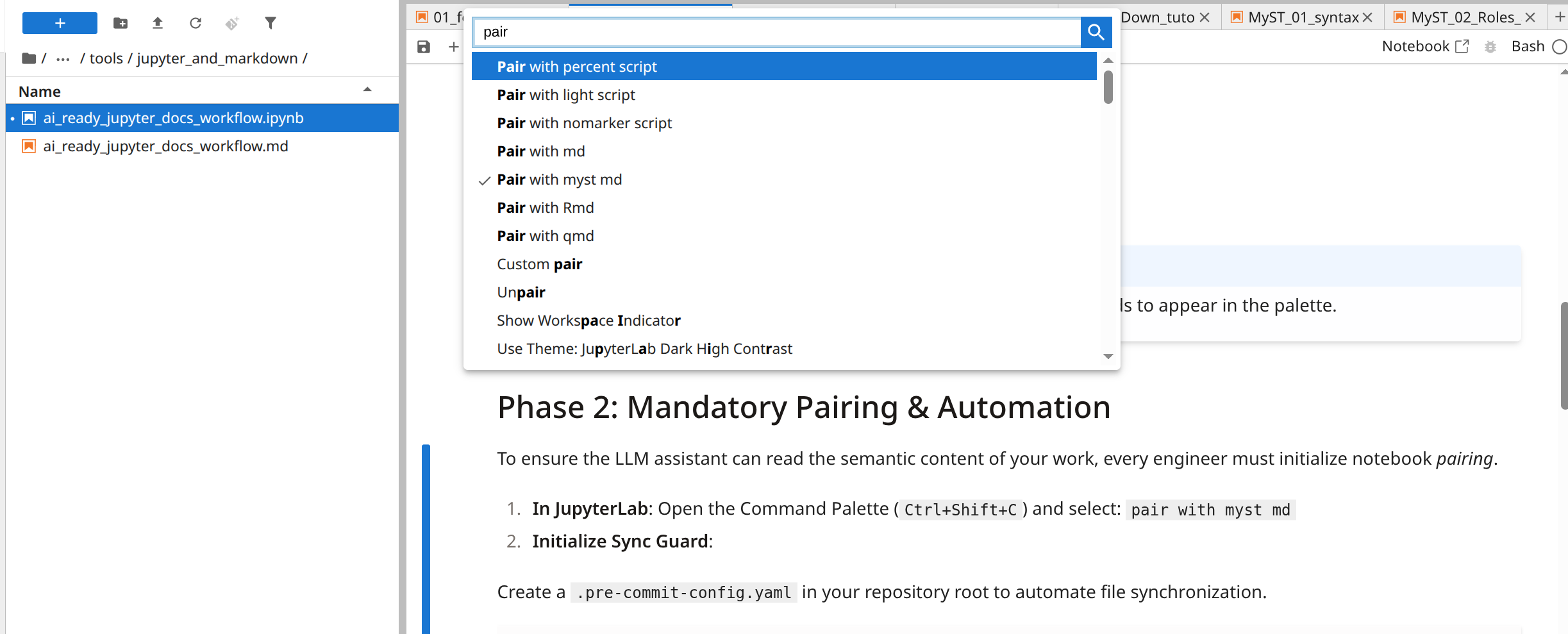
Phase 4: Validation Gates
“Jupyter keeps paired
.pyand.ipynbfiles in sync, but the synchronization happens only when you save the notebook in Jupyter. If you edit the.pyfile manually, then the.ipynbfile will be outdated until you reload and save the notebook in Jupyter, or executejupytext --sync.”
Jupytext official documentation
This means:
If you edit the
.mdfile in Aider →.ipynbis stale.If you open the
.ipynbin Jupyter and save it →.mdis up to date.If you commit without syncing → Git sees two different versions (one is outdated).
Pre-commit hook: Sync Guard
Before each commit, the hook runs:
jupytext --sync <file>If the two files differ, the hook fails and the commit is blocked, forcing you to fix the inconsistency.
CI Verification
To ensure that no desynchronized notebooks reach the main branch, add a CI check that validates all paired notebooks are in sync.
Phase 5: Workflow for AI Engineering
In a real-world project, your workflow transitions from active coding to version control using the automation you have built.
Keep both
.ipynband.mdin GitUse
.mdfor diffs, PRs, and Aider inputUse
.ipynbas the source formyst build(so outputs appear)Ensure
.ipynboutputs are up-to-date before merge (via team discipline or CI execution)
This gives you:
Clean diffs ✅
LLM-friendly input ✅
Rich, output-inclusive published docs ✅
Here is exactly what happens when you decide to commit your changes.
Human Workflow
Edit and Execute: You work inside your
.ipynbfile using your central JupyterLab. You change a function and run the cell to see the output.Save (Ctrl+S): When you save in JupyterLab, Jupytext immediately updates the paired
.mdfile on your disk.Current state: Both
.ipynband.mdare updated.
Stage Files for Git: You go to your terminal or Git UI and add your changes:
git add my_notebook.ipynb my_notebook.md

# or just
git add my_notebook.*
The Commit (The Sync Guard): You run your commit command:
git commit -m "refactor: Update data cleaning logic"Pre-commit Trigger: Your
pre-commithook kicks in. It runsjupytext --sync. If you accidentally edited the.mdfile with another tool (like VS Code or Aider) and forgot to sync it back to the.ipynb, the hook ensures they are identical before the commit is finalized.
AI-Assisted Workflow with Aider
For smooth work with Aider you need to configure two files:
.aider.conf.ymlCONVENTIONS.md
Alternative
You can inject a system prompt while working with Aider, like this one:
“After editing any .md file, always run ‘jupytext --sync ’ to ensure the paired notebook is updated.”
But this is error prone, because you have to add it manually each time you run Aider.
lint-cmd: Configure Commit Workflow
We use Aider’s scripts or lint functionality. By adding this to .aider.conf.yml, we tell Aider to treat a desynced notebook as a “linting error” and fix it automatically.
This configuration tells Aider to run the sync command whenever it modifies a file that has a notebook pair.
# .aider.conf.yml

# Run Jupytext sync as a 'lint' step after Aider makes changes
lint-cmd:
  - "md: uv run jupytext --sync"
  - "ipynb: uv run jupytext --sync"

auto-lint: true
The commit workflow is now fully hands-off:
AI Edit: You tell Aider: “Update the loss function in foundations.md.”
Auto-Sync: Aider finishes the edit. Because of our
lint-cmdsconfig, Aider automatically runsjupytext --syncbehind the scenes.Atomic Commit: You stage both files and commit them together.
Sync Guard Approval: The pre-commit hook runs, sees that the files are already perfectly in sync, and allows the commit to pass instantly.
aider auto-commits off
Aider’s Auto-Commits fail in our workflow because when it edits notebook.md, it:
Modifies the
.mdfile.(Optionally) runs
lint-cmd→ updates.ipynbin working tree.Stages only the file it directly edited (
notebook.md).Does not stage
.ipynb, because aider never touched it directly.
Then it runs git commit → pre-commit fails → aider silently aborts to commit.
Even with auto-lint: true, aider cannot stage files it didn’t edit. This is a fundamental limitation of aider’s architecture.
🚫 aider’s auto-commits are incompatible with paired notebook workflows that require atomic multi-file commits.
Thus, disable aider commits and treat it as an editor only:
# .aider.conf.yml
auto-commits: false
Then:
Let aider edit
.md.Run
git add *.md.Run
git commit→ pre-commit syncs + fails.Run
git add *.ipynb→git commit→ success.
This is more reliable, auditable, and aligns with GitOps.
CONVENTIONS.md file
For more information see official documentation.
In the repo’s root directory create a file CONVENTIONS.md.
Key Principles for aider-Centric CONVENTIONS
Ultra-concise: Max 3–5 lines. aider’s context window is precious.
Imperative tone: Direct commands, no explanations.
Syntax-prescriptive: Explicitly state what to preserve and what to never change.
No examples: Examples consume tokens and may be reinterpreted as editable content.
Instructions
Add these instruction to the file:
You are editing a MyST Markdown notebook paired with Jupytext.
NEVER convert ```{code-cell} blocks to standard ```bash or ```python.
ALWAYS preserve the exact syntax: ```{code-cell}[optional-kernel].
NEVER alter, remove, or reformat MyST directive syntax.Rationale: This is 178 tokens (including newlines)—minimal, unambiguous, and fits cleanly in aider’s context without crowding the actual document.
Implementation Protocol
Save this as
CONVENTIONS.md.Inject into aider context via:
# .aider.conf.yml
read: CONVENTIONS.md
or in CLI:
aider --read CONVENTIONS.md your_notebook.md
Now CONVENTIONS.md will be loaded to Aider automatically each time you start it.
What Not to Do
Do not add a “convention” telling aider to
git add notebook.ipynb—aider doesn’t control staging logic directly; it relies on Git’s changed-file detection.Do not add human-style instructions like “always commit both”—aider ignores narrative, and your automation already guarantees the outcome.
The Pull Request Experience
When you push to GitHub, the workflow pays off for the Reviewer:
Reviewer opens the PR: They see two files changed.
They click the
.md: They see a clean, line-by-line diff of your logic changes.They ignore the
.ipynb: Because of your.gitattributes, GitHub collapses the.ipynbfile. It’s treated as an “artifact” (the execution state), while the.mdis treated as the “source code.”
Phase 6: The “Logical Identity” Stalemate & Timestamp Drift
Jupytext is engineered to be idempotent. It prioritizes content integrity (code and prose) over file metadata (kernelspec ordering, display names, or execution counts). While this prevents “metadata noise” in Git, it can lead to a stalemate where your system thinks files are out of sync while Jupytext thinks they are identical.
The Problem: Metadata vs. System Clock
A conflict occurs when the .ipynb file has a newer timestamp than the .md file, but the only difference is trivial metadata.
JupyterLab sees the newer timestamp on the
.ipynband blocks the file from opening to prevent overwriting “unsaved changes”.Jupytext CLI (
--syncor--update) compares the actual code/text. If they match, it identifies them as “Unchanged” and refuses to write to the disk to preserve efficiency.The Result: The timestamp mismatch remains, and the file stays “locked” in JupyterLab.
The Solution: Forcing a “Logical” Sync
When the CLI reports “Unchanged” but JupyterLab still complains about timestamps, you must break the deadlock by explicitly defining the source of truth.
| Scenario | Recommended Command | Result |
|---|---|---|
| Markdown is Truth | uv run jupytext --to ipynb <file>.md | Overwrites the notebook. Realigns metadata exactly to the .md state. Wipes existing outputs. |
| Keep Outputs + Sync | uv run jupytext --update --to ipynb <file>.md | Merges text changes into the notebook. Preserves execution outputs. |
| Fix Clock Drift | touch <file>.md && uv run jupytext --sync <file>.md | Artificially makes the .md the newest file, forcing Jupytext to “win” the timestamp race. |
Preventative Configuration
To minimize these “safety locks” caused by cloud sync (e.g., Yandex.Disk) or minor metadata jitter, add a safety margin to your project configuration.
File: jupytext.toml (or pyproject.toml under [tool.jupytext]):
# Allow the notebook to be up to 60 seconds newer than the text file
# without triggering a "stale" warning in JupyterLab.
outdated_text_notebook_margin = 60

# Filter out minor metadata changes that cause sync stalemates
notebook_metadata_filter = "-all"
Semantic Notebook Versioning & Critical Maintenance Notes
Conflict Resolution: If a merge conflict occurs, resolve it within the
.mdfile. The pre-commit hook will then propagate those changes back to the.ipynb.Sync Logic: The
--syncflag updates both files based on the most recent timestamp. Ensure your system clock is accurate when working across distributed environments.