Connect your aider or Open WebUI to the capable LLMs, like Gemini, Grok, etc. with the free or paid teer. This allows you to work with much bigger context windows than the local LMs provide.
1. Obtain an API Key
Gemini
Get it in the Google AI studio, free tier is enough for start.
GROQ
Groq currently offers free API access to the models they host. Obtain your API key here: https://
OpenRouter
2. Add an API Key to Aider
You can pass an API key using either the command line or the config file:
$ aider --model gemini/gemini-3-flash --api-key gemini=<your_api_key>Using your LOCAL ~/.aider.conf.yml. Set Gemini as the main (architect) model and save the API key:
$ ~/.aider.conf.yml

model: gemini/gemini-3-flash

api-key:
  - gemini=<your_api_key>
  - groq=<your_api_key>
  - openrouter=<your_api_key>
Now you can launch it like this, the Gemini model will be used as a main model.
$ aiderLaunch other models with --model flag, like this:
$ aider --model openrouter/openai/gpt-oss-120bSee how to get the list of models in the 3. List models section below.
Limits
But it is a better idea to choose a model via command line because each model you request via API has its limit:
$ aider --model gemini/gemini-3-flashGemini Free tier limits
You can control the usage here:
How Gemini rate limits work
Rate limits are usually measured across three dimensions:
Requests per minute (RPM) Tokens per minute (input) (TPM) Requests per day (RPD) Your usage is evaluated against each limit, and exceeding any of them will trigger a rate limit error. For example, if your RPM limit is 20, making 21 requests within a minute will result in an error, even if you haven’t exceeded your TPM or other limits.
Rate limits are applied per project, not per API key. Requests per day (RPD) quotas reset at midnight Pacific time.
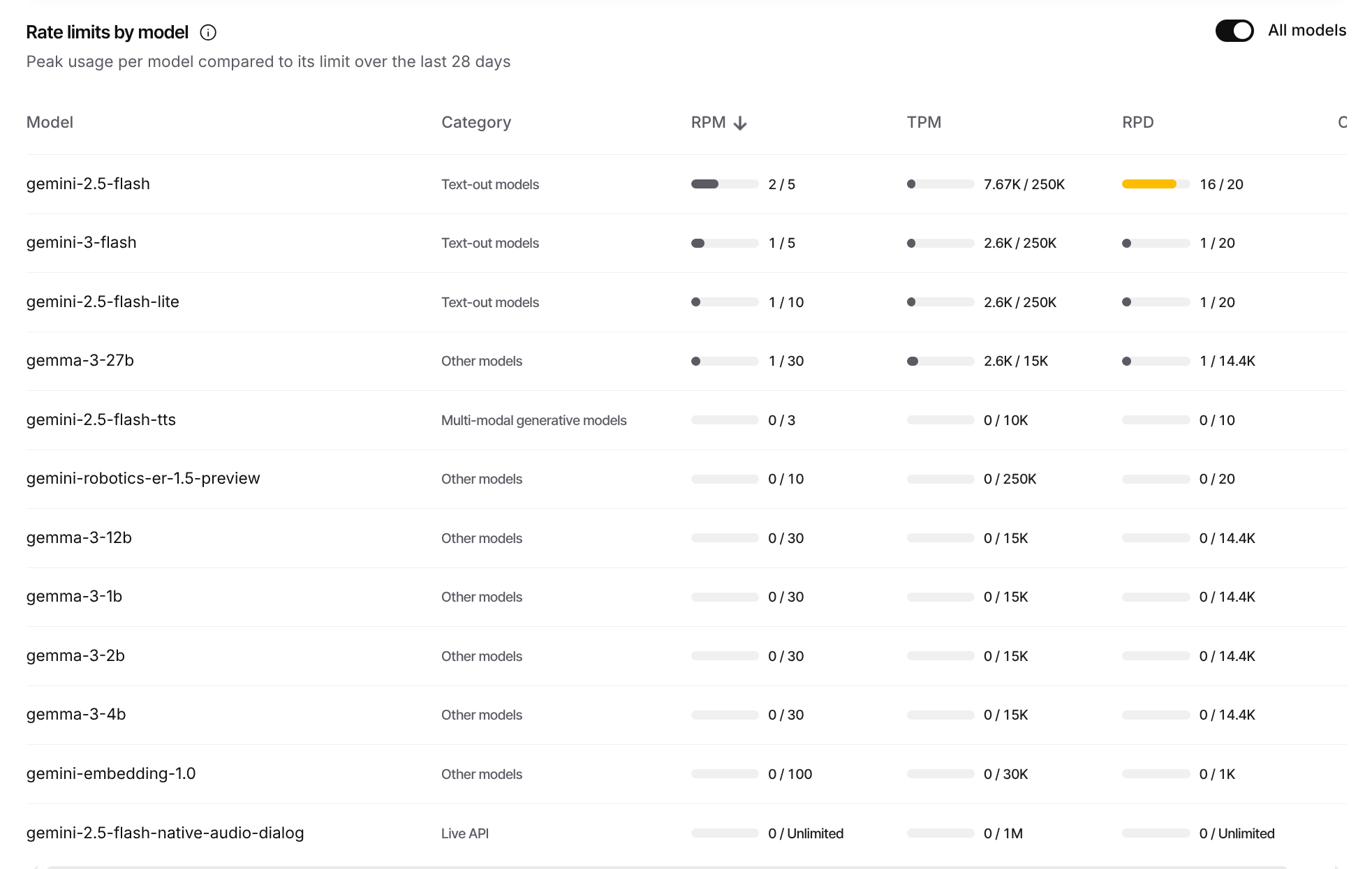
Free tier rate limits by model. Peak usage per model compared to its limit over the last 28 days
OpenRouter Limist
3. List models
In aider, you can list available models for the given provider with this command:
$ aider --list-models gemini/

$ aider --list-models groq/
On 13 Jan 2026, the free API keys of Google, GROQ, OpenRouter support these models with limits:
| Model (Free‑Tier) | Token Per Request | Token Per Minute | Requests per day |
|---|---|---|---|
| GROQ | |||
| gemma-7b-it | |||
| llama-3.1-8b-instant | |||
| llama-3.3-70b-versatile | 12K | ||
| meta-llama/llama-4-maverick-17b-128e-instruct | |||
| meta-llama/llama-4-scout-17b-16e-instruct | |||
| meta-llama/llama-guard-4-12b | |||
| moonshotai/kimi-k2-instruct-0905 | |||
| openai/gpt-oss-120b | 8K | ||
| openai/gpt-oss-20b | |||
| qwen/qwen3-32b | 6K | ||
| Gemini | |||
| gemini-3-flash-preview | 20 | ||
| gemini-3-flash | 250K | 20 | |
| gemini-2.5-flash | 250K | 20 | |
| gemini-2.5-flash-preview-09-2025 | 20 | ||
| gemini-2.5-flash-lite | 250K | ||
| gemma-3-27b-it | 15K | 14.4K | |
| OpenRouter | 50 for all models | ||
| qwen/qwen3-coder:free | |||
| qwen/qwen3-next-80b-a3b-instruct | |||
| qwen/qwen3-235b-a22b | |||
| qwen/qwen-plus | |||
| qwen/qwen-turbo | |||
| deepseek/deepseek-r1-0528:free | |||
| deepseek/deepseek-v3.2 | |||
| google/gemini-2.5-flash-lite | |||
| google/gemini-2.0-flash-lite-001 | |||
| google/gemini-2.0-flash-001 | |||
| x-ai/grok-4.1-fast | |||
| x-ai/grok-4-fast | |||
| x-ai/grok-code-fast-1 | |||
| x-ai/grok-3-mini | |||
| meta-llama/llama-3.3-70b-instruct:free | |||
| meta-llama/llama-3.1-405b-instruct |
To use these models, add prefix of the provider: groq/, gemini/, openrouter/.
4. Orchestrate Models
Switch between models during aider session
In the /architect mode the capable LLM can act as the main model to help you prepare the plan based on the large context while the local or the cheaper model set as editor-model can do the coding, testing, and fixing, saving you tokens.
Edit your local, NOT the repo’s .aider.conf.yml:
$ ~/.aider.conf.yml

editor-model: ollama_chat/qwen2.5-coder:14b-instruct-q4_K_M
Now in the /architect mode the Gemini model will send tasks to the local Qwen model on your local GPU.
5. API and Sensitive Data
The “Free-Tier” Trade-Off
In the AI industry, “Free” is rarely without cost.
Data Collection & Training: Most providers (notably Google Gemini on the Unpaid Service) use your prompts and outputs to “improve and develop products.” This means your inputs may be used to train future iterations of the model.
Human Review: To ensure quality, samples of free-tier data are often reviewed by human contractors. While Google “de-identifies” this data, the content of your prompt (e.g., a specific server path or a unique methodology) remains visible to the reviewer.
The “Privacy Hack”: Switching to a Paid/Billing-enabled tier (even if you stay within the free usage limits) typically shifts your account to an Enterprise privacy agreement where data is not used for training or human review.
Classification of Data
Before sending a prompt, identify the sensitivity level of the content:
| Class | Examples | Action |
|---|---|---|
| Tier 1: Public | Documentation for open-source tools, generic code. | Safe for Free Tier. |
| Tier 2: Internal | Methodological docs, architecture diagrams, internal naming conventions. | Sanitize before using Free Tier. |
| Tier 3: Sensitive | Server configs, IP addresses, internal hostnames, non-public API endpoints. | Do Not Use on Free Tier without strict masking. |
| Tier 4: Critical | Passwords, Private Keys, PII (names/emails), Production DB schemas. | Strictly Prohibited on all Cloud LLMs. |
Mandatory “Hygiene” for Server Configs
Server configurations are high-risk because they provide a “map” of our infrastructure. When using Aider or the CLI with these files:
Masking IPs/Domains: Never send real production IPs.
Bad:
bind 192.168.1.45Good:
bind [INTERNAL_IP_APP_SERVER]Neutralizing Paths: Use generic paths for sensitive internal directories.
Bad:
/home/admin/secret_project/config/Good:
/opt/app/config/Environment Variables: Always use placeholders for credentials.
Bad:
DB_PASS=S3cureP@ssword!Good:
DB_PASS=${DB_PASSWORD}
How to Work Safely (The Workflow)
Step A: The “Sanity Check”
Ask yourself: “If this prompt appeared on a public billboard, would it cause a security incident?” If the answer is yes, do not send it to a free-tier API.
Step B: Opt-Out of Analytics (CLI Level)
When using tools like aider, ensure you have disabled the tool’s own telemetry:
# Disable Aider's internal analytics
aider --analytics-disable
Step C: Use Local Models for Tiers 3 & 4
For server configs or highly proprietary docs, use a local LLM that runs entirely on your machine.
Tool: Ollama
Command:
aider --model ollama_chat/llama3.3(No data leaves your RAM).
Summary Checklist
Is Billing Enabled? If yes, you are generally covered by Enterprise privacy.
Are Secrets Masked? Check for IPs, keys, and internal names.
Is Telemetry Off? Ensure
--analytics-disableis in your.aider.conf.yml.Local First: If it’s a “crown jewel” config, use a local model instead.
The .aider.conf.yml Template
##########################################################
# Aider Privacy & Security Configuration
##########################################################

# 1. DISABLE TELEMETRY
# Prevents Aider from sending usage statistics to its own servers.
analytics: false

# 2. MODEL SETTINGS
# Defaulting to a high-capability model, but you can override this via CLI.
model: gemini/gemini-1.5-pro

# 3. PREVENT UNINTENDED FILE ACCESS
# Ensure Aider only sees files you explicitly add.
map-tokens: 1024
read: [CONVENTIONS.md] # Always load your methodological guidelines if they exist

# 4. GIT INTEGRATION
# Auto-commit helps track changes, but set to false if you want
# to review diffs for leaked secrets before committing.
auto-commits: true

# 5. UI/UX
# Disable the browser-based GUI to keep everything in the encrypted terminal.
gui: false

# 6. RESTORE SAVED SESSIONS
# Keeps your chat history local to your machine.
restore-chat-history: true

##########################################################
# Tips for the Team:
# - To use a local model for sensitive configs:
#   aider --model ollama/llama3.3
# - To check your current settings:
#   aider --help
##########################################################
How to Deploy This
For the Team: Share this file and instruct them to save it as
.aider.conf.ymlin their home directory (~/.aider.conf.yml) to apply it globally.For Specific Projects: If a project has specific server configs, place a copy of this file in that project’s root folder. Project-level configs override global ones.
The
.gitignoreRule: Remind the team to add.aider*to their.gitignoreif they don’t want their chat history or local metadata uploaded to a shared repository.
One Last Safety Tip
Since you are working with Server Configs, I highly recommend adding a CONVENTIONS.md file to your project. Inside it, write:
“When editing configuration files, always use placeholders like
[IP_ADDRESS]or[DOMAIN]instead of real values.”
Aider reads this file and will proactively help you follow your own privacy handbook.